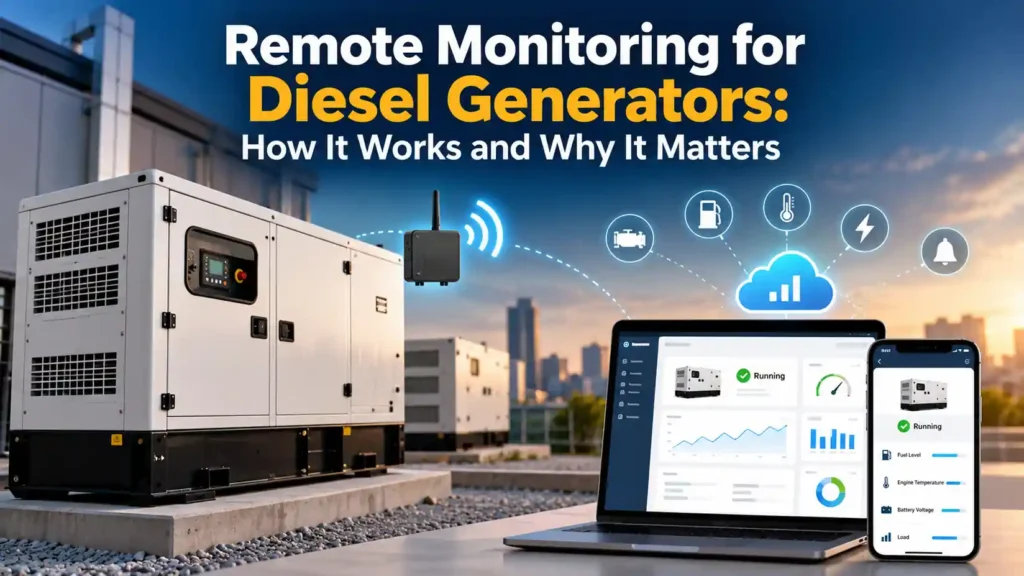


A generator can sit quietly for months and still look “ready” from the outside. The problem is that a weak battery, failed charger, low fuel level, controller alarm, transfer-switch problem, or missed exercise can remain unnoticed until utility power fails. Remote monitoring gives me visibility between service visits.
Modern systems range from simple cellular alert modules to cloud platforms that collect engine, alternator, transfer-switch, and sensor data across an entire fleet. Cummins PowerCommand Cloud, for example, supports 24/7 remote monitoring, multi-site management, real-time notifications, and remote asset control. Generac’s Mobile Link provides remote status and alerts for compatible standby systems.
Remote Monitoring for Diesel Generators: What It Can Show
| Data point | What it tells me | Why it matters |
|---|---|---|
| Run status | Running, stopped, exercising | Confirms whether the engine actually started |
| Generator mode | Auto, manual, off | A unit left out of Auto may not respond to an outage |
| Faults and warnings | Low oil pressure, high temperature, fail-to-start, low battery, etc. | Lets me react before the next outage |
| Battery voltage | Starting-system health trend | Weak batteries are a common no-start cause |
| Run hours | Total operating time | Drives service intervals |
| Voltage/frequency | Electrical output data | Helps verify stable generation |
| Load/kW/kVA | How hard the generator is working | Useful for sizing and overload detection |
| Fuel level | Remaining stored fuel when sensor is installed | Supports refueling planning |
| ATS status | Utility/generator source and transfer state | Confirms the backup path, not just the engine |
How Remote Generator Monitoring Works
At the generator, a gateway or communication module connects to the controller, transfer switch, and any external sensors. That gateway sends data through Ethernet, Wi-Fi, cellular service, or another communications path to a cloud platform or local monitoring system.
I then use a web dashboard or mobile app to see the equipment. Depending on the system and permissions, I may be able to view real-time values, acknowledge alarms, change an exercise schedule, reset a fault, or send a remote start/stop command.
| Layer | Typical equipment | Purpose |
|---|---|---|
| Generator controls | Engine/genset controller | Creates operating and fault data |
| Sensors | Fuel, temperature, battery, tank, room sensors | Adds information not already in controller |
| Gateway | Ethernet/cellular/Wi-Fi device | Transfers data off site |
| Cloud/server | Monitoring platform | Stores, trends, and processes information |
| User interface | Phone, tablet, browser | Shows status and sends notifications |
The Biggest Benefit: I Know About a Failure Before the Power Goes Out
If a generator’s battery charger fails on Monday and nobody looks at the controller until Friday, the battery may be weak by the time a storm arrives. Remote monitoring can send a warning while I still have time to act.


The same applies to fail-to-exercise alarms, low fuel, high coolant temperature, low coolant, emergency-stop status, transfer-switch problems, and controller communication loss. Not every platform monitors every condition, so I verify the actual data points supported by the generator model.
Exercise Monitoring Is More Valuable Than It Sounds
Automatic exercise is supposed to prove the engine can start. But if I never confirm that the exercise actually happened, the schedule gives me false confidence.
With remote monitoring, I can see the start event, runtime, warnings, and whether the unit returned to normal standby condition. Some systems let me customize maintenance reminders by calendar time, run hours, or both.
For a deeper maintenance schedule, see How Often Should Diesel Generators Be Serviced?.
What Cummins PowerCommand Cloud Can Monitor
Cummins describes PowerCommand Cloud as a cloud-based system for 24/7 monitoring, multi-location management, real-time notifications, and remote control. Its published feature information includes generator and transfer-switch monitoring, fault/warning events, alternator data, engine data, data trending, event export, and customizable maintenance reminders.
Cummins also states that the platform can provide real-time information such as fuel levels, battery voltage, and overall system health when the necessary sensors and integrations are present.
| PowerCommand Cloud capability | Example use |
|---|---|
| 24/7 monitoring | Check status outside business hours |
| Multi-site view | Manage generators at many locations |
| Fault notifications | Receive alerts immediately |
| Data trending | See whether voltage, load, or battery condition is changing over time |
| Remote controls | Start, stop, reset, or exercise where supported and authorized |
| Maintenance reminders | Track service by hours and calendar time |
Remote Monitoring for a Single Home Standby Generator
A homeowner usually needs less complexity than a hospital or telecom fleet. I mainly want to know whether the generator is ready, whether it exercised, whether there is a fault, and whether maintenance is due.
Generac’s current Mobile Link information emphasizes real-time generator status, text/email/push alerts, exercise management, and maintenance reminders for compatible standby systems. That is a useful level of visibility if the generator is at a second home, rental property, or a house I leave unattended for part of the year.
Remote Monitoring for Businesses and Generator Fleets
For businesses, the value increases because one technician may be responsible for generators at dozens or hundreds of sites. I can sort locations by alarm status instead of driving to every site on a fixed route just to discover that everything is normal.
Fleet monitoring can also reveal patterns. If three generators of the same age are showing falling battery voltage, I may replace batteries proactively. If one site consistently runs at only 8% load, I may investigate oversizing or load strategy.


Technical Data I Like to Track
| Parameter | Normal use | Potential warning sign |
|---|---|---|
| Battery voltage | Starting readiness | Downward trend or charger fault |
| Coolant temperature | Engine thermal condition | Unusual rise under similar load |
| Oil pressure | Lubrication condition | Below manufacturer specification |
| Frequency | Engine speed/output stability | Persistent under/overfrequency |
| AC voltage | Alternator/regulator output | Unstable or out-of-range values |
| Load | Generator utilization | Unexpected overload or chronic underload |
| Run hours | Maintenance planning | Service interval reached |
I use manufacturer limits for alarms rather than inventing universal numbers. A 480 V industrial set and a 240 V residential set obviously need different voltage thresholds.
Fuel Monitoring Can Prevent an Avoidable Shutdown
On long outages, fuel becomes the critical resource. If the tank sensor is connected to the monitoring platform, I can see the level remotely and dispatch a fuel delivery before the generator reaches its pickup limit.
I still verify the sensor physically during maintenance because tank gauges can fail or drift. Remote data is only as trustworthy as the sensor feeding it.
For planning fuel consumption, see How Much Fuel Does a Diesel Generator Use?.
Remote Monitoring Does Not Replace Load Testing
A dashboard can tell me the engine ran for 15 minutes, but it cannot prove the generator will carry full building load unless the generator actually sees meaningful load.
I still perform functional transfer tests and periodic load testing or load-bank testing when appropriate. Remote monitoring adds documentation and visibility; it does not make the mechanical and electrical tests unnecessary.
Communication Options: Cellular, Ethernet, or Wi-Fi?
| Connection | Advantages | Limitations |
|---|---|---|
| Ethernet | Stable, no cellular signal needed | Depends on site network and router power |
| Wi-Fi | Easy at homes and small sites | Signal and router outages can interrupt monitoring |
| Cellular | Independent of local wired network | Needs signal and a data plan/service |
| Dual-path | Better resilience | Higher cost and configuration complexity |
I think about what happens during the exact event I care about. If utility power fails and the modem/router loses power before the generator transfers the network equipment, cloud monitoring may disappear temporarily. Critical sites often put communications gear on UPS power or use cellular gateways.
What Happens If the Internet Goes Down?
The generator should still perform its core backup function locally. I do not design a standby system that requires a cloud connection to recognize utility failure and start the engine. Remote monitoring is an overlay, not the fundamental control path.
If communications fail, I want the local generator controller and ATS to continue operating normally and store events for later retrieval when possible.
Cybersecurity Matters
Anything connected to a network deserves security attention, especially when remote start/stop or control functions are available. I use strong account credentials, multi-factor authentication where offered, role-based access, current gateway firmware, and network segmentation appropriate to the facility.
I also limit remote-control permissions. A person who only needs to view status should not automatically have authority to stop a running emergency generator.
Alert Fatigue Is a Real Problem
If every small event sends an urgent text to ten people, users eventually ignore the alerts. I classify notifications by severity.
| Alert level | Example | My response |
|---|---|---|
| Critical | Fail to start, low oil pressure shutdown, high temperature shutdown | Immediate response |
| High | Low fuel, charger failure, generator not in Auto | Same-day response |
| Advisory | Maintenance approaching, exercise completed | Schedule/record |
| Informational | Normal run/stop status | Log unless context requires action |
How Remote Monitoring Helps Prevent Downtime
The value is not that monitoring fixes the generator. It shortens the time between failure and awareness. A failed battery charger discovered 20 minutes after it happens is easier to deal with than one discovered during an outage three weeks later.
Cummins specifically positions PowerCommand Cloud as a way for service providers to identify routine issues remotely and schedule proactive service based on data. That is exactly how I think about the technology.
What Does Remote Monitoring Cost?
Costs vary widely. I may pay for a communication module, installation, sensors, a cellular data plan, software subscription, dealer monitoring, or combinations of those items. Home systems can be relatively inexpensive; enterprise platforms across many sites can become a significant recurring service expense.
I compare that cost with the cost of truck rolls, emergency calls, spoiled inventory, downtime, and missed maintenance.
When Remote Monitoring Makes the Most Sense
I see the strongest value at remote properties, businesses with expensive downtime, medical and telecom facilities, rental fleets, refrigerated operations, water systems, multi-site chains, and any location where nobody looks at the generator every day.
It can also be valuable for a home generator when the owner travels frequently or manages the property remotely.
My Installation Checklist
I confirm controller compatibility, ATS compatibility, available sensors, communications signal, power supply for the gateway, account ownership, user permissions, alarm recipients, cybersecurity, and what happens when communications are lost.
Then I test the system. I create a noncritical alert, verify that the message reaches the correct people, confirm the exercise event appears, and compare dashboard data with the local controller.
Frequently Asked Questions
Can I monitor a diesel generator from my phone?
Yes, many modern systems support mobile apps or browser dashboards. Compatibility depends on the generator controller and monitoring hardware.
Can remote monitoring tell me the fuel level?
Yes if a compatible fuel-level sensor is installed and connected to the system.
Can I start the generator remotely?
Some platforms allow remote start/stop or exercise control. I use those functions only with proper permissions and site safety procedures.
Does remote monitoring replace preventive maintenance?
No. It helps schedule and target maintenance, but I still inspect, service, exercise, and load-test the equipment.
Will the generator still work if the cloud service is down?
A properly designed standby system should continue its local start, transfer, protection, and shutdown functions without internet access.
My Bottom Line
I consider remote monitoring one of the most useful upgrades for a generator that matters to business continuity. It turns the generator from a machine I hope is ready into an asset whose condition I can actually see between service visits.
The biggest value comes from early warning: low battery, low fuel, failed exercise, controller alarms, charger problems, or a unit left out of Auto. For multiple sites, the fleet view can save enormous time.
I still maintain and test the generator physically. But when remote monitoring is configured correctly, I know where to send attention first—and that can make the difference between fixing a warning today and discovering a failure during tomorrow’s outage.
Sources and Technical References
I reviewed current information from Cummins PowerCommand Cloud, Cummins published feature documentation, and Generac Mobile Link. Features vary by controller, gateway, subscription, sensors, and region.